Edit photos on your Android phone
Photoshop Express allows you to edit and fix photos on your Android device.
What can you do with Photoshop Express?
In truth, this app is an extremely watered-down version of Adobe Photoshop, which is quite limited in its functionality. Photoshop Express allows you to perform basic image editing tasks, giving you the option to select a photo from your phone or Adobe Revel, or take one using the device's camera.
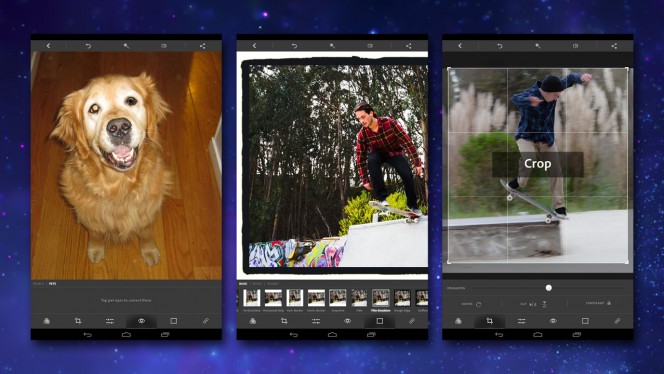
Adobe Photoshop Express furnishes you with several useful tools for tidying up pictures or giving them a creative new look. There's an option to crop and straighten images, which includes the ability to flip the picture or constrain the proportions as you resize the canvas.
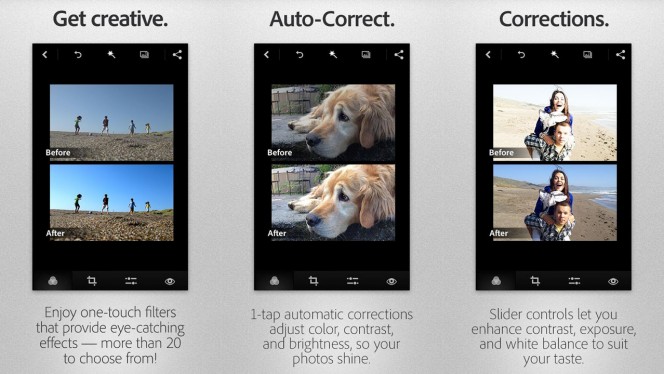
You can use Adobe Photoshop Express to correct various aspects of a photo, including clarity, contrast, shadows, temperature, and more. Alternatively, hit the Looks button and you can apply one of a number of preset filters to the image, in much the same way as you would with Instagram or Retrica, for example. Many of the adjustment effects and filters are free, though some you'll have to pay for.
Other tools within Photoshop Express include red-eye removal, borders and frames, and a blemish remover. There's an auto-adjustment tool too, if you can't be bothered to tinker around with the image yourself.
Once you're done editing you can save your image to your device or to Adobe Revel, or share it via social media or messaging.
Slide rule
The in Photoshop Express are great for quick fixes or applying instant effects, but not for more complex adjustments or image processing. Photoshop Express is really just designed for quick photo editing on the move. If viewed in this way, it's actually a great success because the user interface is so intuitive.
Most of the editing requires you to move a slider to increase or decrease the intensity of a particular effect or setting. There's an undo feature if you make a mistake, and even a before/after button that you can hold down to see the original image (i.e. before you made the changes).
Good for the basics
All in all, Photoshop Express is a decent portable, on-the-fly image editor. Just don't expect anything more than the most basic of imaging tools.

















User reviews about Adobe Photoshop Express:Photo Editor Collage Maker
by Anonymous
4 Stars.
Nice app at all. But the tools is not complete as adobe photoshop. Ofcoz it juz for android n its free, although, it used to edit the picture by using the android phone. But i hope the creator for this app will have another more option for this.
Pros:
nice app, got a tools almost same like the real adobe photoshop.
Cons:
the tools are not complete as adobe photoshop. More